Arabic and English social posts from one n8n workflow
I built an n8n workflow that writes both languages at once, renders a five-slide carousel, and publishes to three platforms after I approve each stage from Telegram.
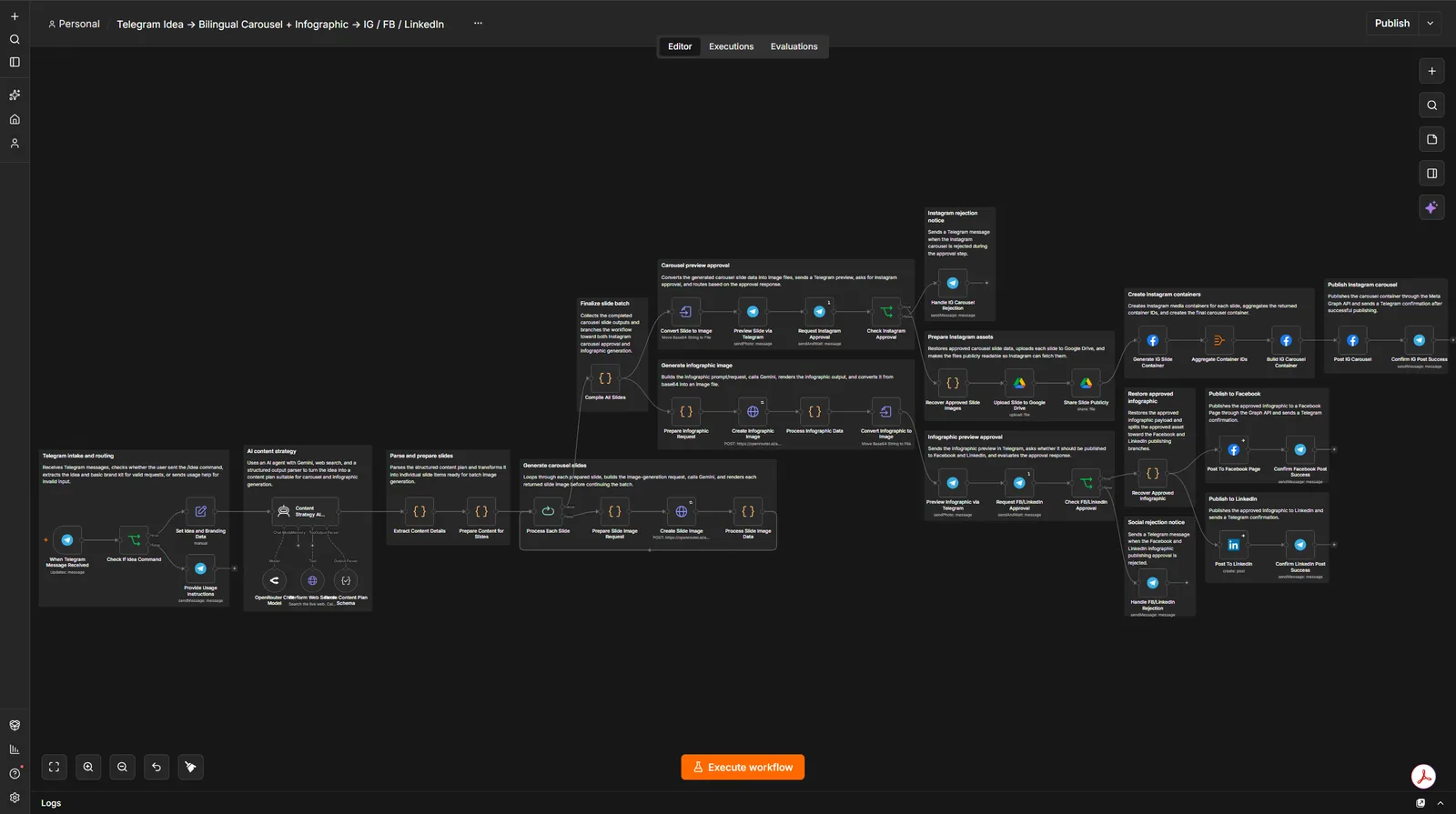
A bilingual social post normally costs three subscriptions and about two days. This n8n workflow does it from one Telegram message. A model writes the Arabic and the English together, renders a five-slide carousel and a matching infographic, and publishes to Instagram, Facebook and LinkedIn once I approve each stage from my phone. The important part is that Arabic is written alongside English rather than translated after it, and that single change is what fixes the output.
Why does Arabic usually come out worse?
Because of the order the work happens in. The English post gets written first, by someone thinking in English, and Arabic is produced from it afterwards by a translation step that has no idea what the design looks like. The result reads like a translation, because it is one. Line breaks fall in the wrong place. The hook that worked in English lands flat. Half the time the text is set left-aligned in a right-to-left language and nobody notices until it is live.
I have watched small businesses here publish that way for years. They are not being careless. The tooling assumes one language, and Arabic gets bolted on at the end.
So the workflow has no translation step. The strategist prompt asks for one content plan carrying both languages in the same structured object, slide by slide. Each slide holds its Arabic text and its English text as siblings. Neither is derived from the other.
What does the workflow actually do?
Six stages, and it stops twice to ask.
- A Telegram message starting with
/ideatriggers it. Anything else gets the usage instructions back. - It pulls out the idea text, the chat ID, and a brand kit: brand name, four hex colours, two typefaces, illustration style, the Instagram Business Account ID and the linked Facebook Page ID.
- A strategist agent builds the structured bilingual plan, with a web search tool behind it for when the idea needs a fact it does not already have. On a topic it knows, it says so and skips the search.
- An image model renders each of the five slides against the brand kit. Every preview goes back to the Telegram chat as it finishes.
- I approve or reject. On approval the slides upload to Google Drive, become publicly readable, and the carousel publishes to Instagram through the Facebook Graph API.
- A matching infographic renders, previews, waits for a second approval, then goes to a Facebook Page and to LinkedIn as an image post.
The two approval gates are why I trust it. An image model writing Arabic is right most of the time, not all of the time, and I would rather check five previews on my phone than find a broken ligature in a published carousel.
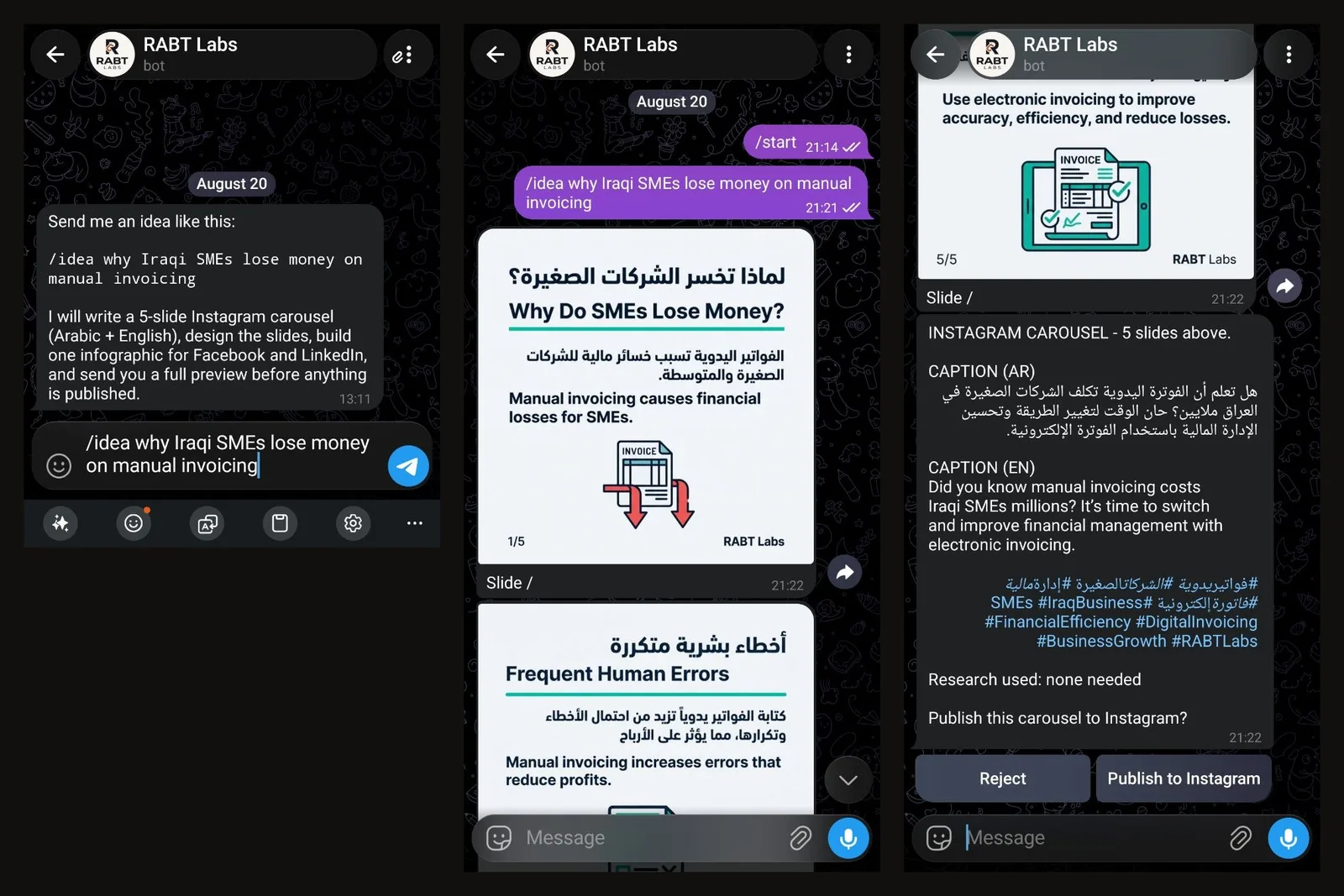
That is one full run: the command, the slides coming back in both languages, and the gate.
Which models does it use?
Three roles, and it is worth separating the roles from the wiring.
The strategist writes the plan. A cheaper, faster model with web search answers factual questions on its behalf. An image model draws the slides and the infographic.
The version I published to the n8n Creators Hub calls Google directly and pins those three roles to Gemini 3.1 Pro, Gemini 3.1 Flash Lite for the grounded search tool, and Gemini 3.1 Flash Image for rendering. The instance I actually run has since moved behind OpenRouter, which changes the credential, the node and the endpoint, and changes nothing else about the shape.
If you import it, you get the direct-to-Google wiring, which is the simpler thing to start from. Move it behind a router later if you want to swap models without touching the canvas.
What was the hardest part?
Getting an image into Instagram, which I did not expect.
Instagram's Content Publishing API does not accept an upload. You hand it an image_url and Meta's servers fetch that URL themselves. So every slide has to be sitting on a public host before the carousel can be created, and that is the only reason Google Drive is in this workflow at all.
Drive turned out to be the weak link. It answers an image request with a redirect, and sometimes with an HTML interstitial instead of image bytes, and Meta's fetcher rejects both. The failure surfaces as a media download error at container creation, several nodes away from the actual cause, which is a miserable thing to debug at one in the morning.
It works. I would not call it solid. Only one node consumes that URL, so swapping Drive for Imgur, Cloudinary, S3 or R2 is a two-node change, and anyone rebuilding this should probably start there instead.
What does it cost to run?
Model calls, and nothing else, assuming you already self-host n8n. One run is a handful of text calls plus six image generations: five slides and one infographic. Telegram is free. The Graph API is free. Drive is free. Whether that bill lands with Google or with a router depends on which wiring you use, and the call count is the same either way.
The cost that is easy to miss is Meta's App Review. Instagram and Facebook publishing needs an app approved for instagram_content_publish and pages_manage_posts, and until that approval lands you can only publish to accounts holding a role on your own app. That is a real wait, and it is not the kind of problem you solve by being clever.
You also need an Instagram Business account linked to the Facebook Page you intend to post to. A creator account will not do it.
How does it fail?
Quietly, and on purpose.
Both approval cards expire after twelve hours. If I am asleep and never answer, the run ends and nothing publishes. That is intended: an automation that posts to a client's Instagram because nobody said no is worse than one that posts nothing at all.
Three other things worth knowing before you build it.
Arabic rendering is good and not perfect. Image models still break a ligature occasionally, which is exactly what the Telegram previews are for.
Instagram carousels accept two to ten items. This one ships five, and the parser enforces a floor of two.
Model IDs live in three separate places: the chat model node, the search tool URL, and both image generation nodes. A 404 model not found almost always means the key cannot reach that model rather than that the ID is wrong, and switching providers means changing it in all three.
Should you build this?
If you post in one language, no. The bilingual structure is the entire point, and without it this is a heavy way to do something a scheduler already does well.
If you post in two languages and one of them keeps arriving as an afterthought, then yes. The piece worth copying is not the n8n canvas. It is the decision to make the model produce both languages in one pass, as one object, before any image exists. Everything after that is plumbing.
I have published the workflow to the n8n Creators Hub so it can be imported and pulled apart rather than rebuilt from a screenshot. Swapping Arabic for another right-to-left language takes two edits: the strategist system message, and the alignment rules in the slide prompt builder.